





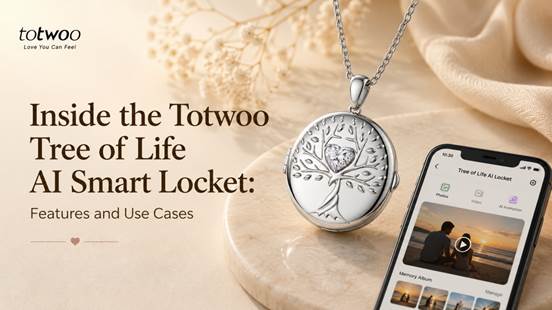
The Totwoo Tree of Life AI Smart Locket combines a jewelry-style pendant with an internal digital display. It can show selected photographs, a short video or an AI-generated animation after the content has been transferred from a compatible phone.
It requires more setup and maintenance than a traditional photo locket. Buyers need to install an app, connect the pendant through Bluetooth, prepare the media and recharge the device periodically. In return, the content can be changed without physically printing and inserting another photograph.
| Transparency note: This is a product-feature overview based on Totwoo’s current specifications and official setup instructions. It is not an independent hands-on review, and it does not claim independently tested battery life, display quality or long-term wearing comfort. |
What Is the Tree of Life AI Smart Locket?
The Tree of Life AI Smart Locket is a screen-based digital locket. Opening the pendant activates a small display inside, allowing the wearer to view media stored on the device.
It currently supports three main memory formats:
• Up to five photographs
• One short video
• One AI-generated moving memory
These are alternative memory modes. The locket does not store five photos, a video and an AI animation as one combined gallery.
The exterior Tree of Life design may be associated with family, growth or continuity, but the primary product difference is its internal display and updateable digital content.
What Comes With the Locket?
The current product listing includes:
• One smart locket
• One user manual
• One magnetic USB charging cable
• One gift card
• Gift packaging
The charger is an important part of the product. Because the locket contains a screen and rechargeable battery, media cannot be displayed when the battery is empty.
Buyers preparing it as a gift should keep the complete package together and confirm that the charging cable is included before wrapping it.
How Initial Setup Works
The locket is not ready to display personalized memories immediately after it is removed from the box. It must first be charged, connected and loaded with content.
Step 1: Charge the Pendant
Charge the locket before its first use with the included magnetic USB cable.
Totwoo’s setup instructions also recommend keeping the battery above 20% during media transfer. A low battery may interrupt or prevent the transfer from completing successfully.
Step 2: Download the Totwoo App
The current setup guide provides versions of the Totwoo App for both iOS and Android.
After installing it, the user must open the app and sign in. Buyers should verify that the app is available on the recipient’s phone and in their country before ordering.
Step 3: Enable Bluetooth
Turn on the phone’s Bluetooth and open the locket.
Inside the app, locate the locket connection option. The nearby pendant should then be recognized and connected through Bluetooth.
Totwoo does not publish a guaranteed setup duration. Buyers should not expect the first use to be an instant open-and-play process. Charging, installing the app, signing in, pairing the device, cropping media and transferring the files all require time.
Actual setup time will depend on the phone, network, media files and the user’s familiarity with apps.
Step 4: Select the Content
Photographs and videos can be selected from the phone’s gallery or captured with its camera.
The app provides a cropping stage so the subject can be positioned within the locket’s display area. This matters because the internal screen is much smaller than a phone screen.
Close portraits and photographs with one clear subject are likely to be easier to recognize than wide group photographs. Totwoo recommends clear, well-lit images, particularly when generating AI movement.
Step 5: Transfer the Media
The selected content is transferred from the phone to the locket through Bluetooth.
During transfer:
• Keep the phone near the pendant.
• Do not switch off Bluetooth.
• Do not close the locket.
• Remain on the relevant transfer page.
• Ensure the locket has sufficient battery.
Once the transfer is complete, the media is stored locally on the pendant.
Step 6: Open the Locket to View It
Opening the pendant automatically activates the internal screen and plays the selected memory mode.
A touch point beneath the display provides basic controls:
• In photo mode, tap to move to the next image.
• In video mode, tap after playback to replay the video.
• When the display has switched off, tap to wake it.
The screen turns off shortly after playback to conserve battery.
Photo, Video and AI Memory Limits
The differences between the three memory modes should be understood before preparing the gift.
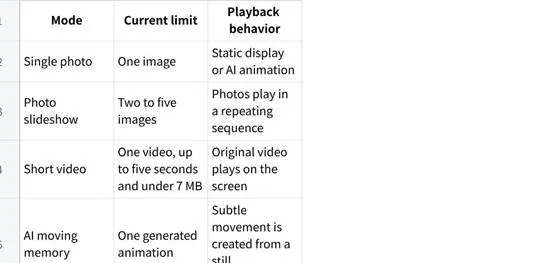
Uploading new content replaces the media currently stored on the locket.
Photo Slideshow
A slideshow is the most suitable mode when several stages of one story matter. Examples include family photographs from different years, relationship milestones or several images of a pet.
The five-photo limit encourages a curated selection, but it may feel restrictive to someone expecting a larger digital photo library.
Short Video
The video must currently be no longer than five seconds and under 7 MB. This can capture a brief movement, such as a pet greeting its owner or family members waving, but it is not designed for extended video messages.
The available product information does not clearly specify audio performance. Buyers should not make sound essential to the gift without confirming current audio support.
AI Moving Memory
The AI mode adds generated movement to one still photograph. The current listing includes ten AI memory creations.
The result depends on the source image. Clear, front-facing and unobstructed photographs are more suitable than dark, blurred or partially hidden faces.
AI animation is not a recovered recording of the photographed moment. The resulting expressions and movement are generated and may not look exactly as the user expects. Preview the animation before transferring it to the locket.
For memorial content involving a person or pet who has died, confirm that the recipient is comfortable with this kind of generated movement. A static photograph may be the more sensitive choice.
What Is the Display Experience?
The media appears on a screen inside the pendant rather than on the wearer’s phone. This distinguishes the product from NFC jewelry that merely opens a webpage when scanned.
However, several display specifications are not clearly published on the current product page, including:
• Exact screen resolution
• Brightness level
• Viewing angles
• Color accuracy
• Performance in direct sunlight
Without independent hands-on testing, it would be inappropriate to make claims about image sharpness, outdoor visibility or color reproduction.
Buyers should expect photographs to appear at pendant scale. Images that look detailed on a phone may lose small facial or background details when viewed on the locket’s compact display.
App, Bluetooth and Internet Requirements
The Totwoo App is required for the initial connection, content preparation and future updates.
Bluetooth transfers the selected media from the phone to the locket. After the files have been transferred, they are stored locally and can be viewed without keeping the phone beside the pendant.
Internet access should be available for:
• Downloading the app
• Signing in to an account
• Accessing updates
• Creating AI animations
• Submitting content through the customization service
Normal playback after a successful transfer does not require a continuous phone or Bluetooth connection.
The product therefore does not need to remain online throughout the day, but it is still dependent on the supporting app whenever the wearer wants to replace the content.
Privacy and Local Storage
Personal photographs may include children, family members, private relationship moments or memorial content. Buyers should understand where these files go.
According to the current Totwoo setup guide:
• Transferred media is saved on the locket.
• Content history is stored locally in the uploader’s app.
• Media is not placed in a public photo gallery.
• Uploading new content replaces the media stored on the device.
• When ownership changes, a new user can connect and transfer replacement content.
AI generation may involve processing beyond an ordinary local Bluetooth transfer. Users should review the current privacy policy before uploading especially sensitive material.
Size, Weight and Everyday Wear
The Tree of Life locket is larger and thicker than many traditional photo pendants because it contains a display, battery and electronic components.
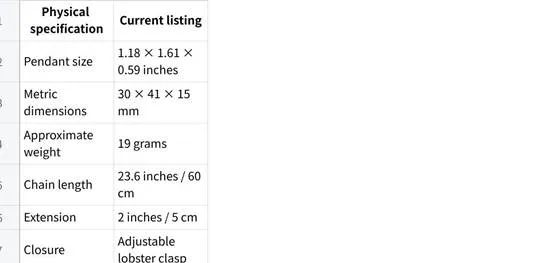
At 15 mm thick, the locket has a substantial profile. At approximately 19 grams, it may suit someone who already wears noticeable pendants, but it may feel too prominent for a person who prefers very small or lightweight jewelry.
Comfort, movement and how the pendant sits against clothing require personal assessment. These factors cannot be confirmed from specifications alone.
Materials and Finish Options
The current product listing includes three versions:
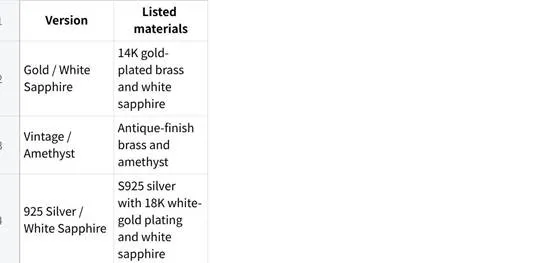
The listing does not describe every version as hypoallergenic. Buyers shopping for someone with known metal sensitivities should ask customer support about the complete material composition before ordering.
Because the pendant contains electronics, users should also review the current care and water-resistance instructions. It should not be treated automatically as ordinary waterproof jewelry.
Battery Life and Charging Frequency
The current specifications claim:
• Up to approximately 300 views per charge
• Approximately 8-10 days of standby time
• Magnetic USB charging
These are manufacturer estimates rather than independently verified results. Real charging frequency will depend on how often the screen is opened and whether it plays static photos, slideshows or videos.
An empty battery does not erase the emotional value of the stored content, but it prevents the screen from displaying it until the pendant is charged.
Buyers should also consider whether replacement charging cables are available. Losing a product-specific magnetic cable may be less convenient than replacing a standard USB cable.
Preparing the Locket Before Gifting
The locket can be loaded with content before it is presented.
One option is to have it delivered to the buyer first. The buyer can then:
Charge the pendant.
Install the app.
Connect it through Bluetooth.
Prepare and transfer the selected media.
Test the full playback sequence.
Recharge it before gifting.
Totwoo also currently offers a “Customize Locket” option through the app for buyers arranging direct delivery. Current submission and shipping instructions should be verified before using that method.
Preloading improves the first-opening experience, but the recipient should still receive the charger and information needed to manage the content later.
Objective Limitations to Consider
The locket has several practical limitations that should be clear before purchase.
An App Is Required
The user needs a compatible phone, Totwoo account and Bluetooth connection to set up or update the locket. It is not suitable for someone seeking a completely offline keepsake.
Media Capacity Is Limited
The current model supports five photos, one short video or one AI memory-not an extensive photo library.
Video Is Very Short
The five-second and 7 MB limit restricts the type of video that can be used.
The Battery Requires Attention
The internal screen does not work when the battery is empty. The wearer must keep the magnetic charging cable and recharge periodically.
AI Results Can Vary
Generated movement depends on the quality and composition of the original photograph. Results are not completely predictable.
The Pendant Is Relatively Substantial
Its 30 × 41 × 15 mm dimensions and approximate 19-gram weight may not suit someone who prefers delicate necklaces.
Long-Term Use Depends on Software and Electronics
The locket relies on a rechargeable battery, screen, Bluetooth connection and supporting app. Its long-term ownership experience therefore differs from a mechanical locket that can hold the same printed photograph for decades.
Who Is It Suitable For?
The locket may suit someone who:
• Regularly wears medium or larger pendants
• Wants to display several selected photographs
• Would value a five-second video
• Enjoys personalized electronic products
• Is comfortable installing and using an app
• Wants to replace the content later
• Does not mind periodic charging
• Understands that AI motion is generated
Potential use cases include a family slideshow for a parent, a relationship timeline for a partner, friendship memories before a move or a carefully selected pet keepsake.
Who May Prefer Another Option?
A traditional photo locket may be more appropriate for someone who:
• Wants no app or account
• Prefers one permanent printed photograph
• Does not want to charge jewelry
• Wears only small, lightweight pendants
• Prioritizes long-term mechanical simplicity
• Does not want personal media handled digitally
• Is uncomfortable with AI-generated images
• Wants an heirloom with minimal software dependency
Someone seeking live signals between two people should consider connected touch jewelry instead. The Tree of Life locket displays stored memories; it is not a paired long-distance communication device.
What to Verify Before Ordering
The current product information provides detailed media, battery and physical specifications, but buyers should still verify:
• Current phone and operating-system compatibility
• Complete material composition for skin sensitivities
• Audio support during video playback
• Water and care guidance
• Replacement-charger availability
• AI privacy and processing terms
• Warranty exclusions
• Return eligibility for customized orders
• Current delivery timing
The product page currently lists a one-year warranty for manufacturing defects and 30-day free returns on eligible purchases. Review the complete policies rather than relying only on the summary.
A Feature Overview, Not an Independent Verdict
The Tree of Life AI Smart Locket provides an internal display, local media playback and three defined memory modes in a wearable pendant. Its most distinctive functions are the five-photo slideshow, five-second video support, AI animation and ability to replace content through the app.
Those functions come with clear tradeoffs: limited capacity, app-based setup, periodic charging, a relatively substantial pendant and dependence on electronic components.
Whether those tradeoffs are acceptable depends on the recipient. An independent “worth it” verdict would require hands-on evaluation of pairing time, display quality, battery performance and long-term comfort. Based on the published features alone, the product is best understood as an updateable digital keepsake-not a technology-free replacement for every traditional photo locket.